3 Way to Become Irreplaceable at Work

By Kelsey Meyer

The most important interview question I ask prospective employees for my online PR firm is, “How will you add value to our company?” This single question gives me a good idea about what they believe makes them valuable, and it sheds light on why they might just be irreplaceable. Once they are hired, we don’t stop asking this question.

I believe employees who truly care about their jobs and the companies they work for are consistently evaluating how they can add value. Creating value is what distinguishes good employees from those you simply can’t do without. Creating value is what makes you irreplaceable.

Here are three ways you can add value and make yourself an irreplaceable employee:

1. Form genuine relationships with clients/partners — Irreplaceable employees keep their eyes open for relationships and partnerships that will bring true value to their companies. They work tirelessly at these relationships in order to help grow the company. An example of this would be Peter Campbell in the show “Mad Men.” In the first season, Don Draper was ready to fire Pete, but was told he couldn’t because Pete held the key to many vital relationships. I am not advocating that you act like a bad employee while zealously protecting relationships to secure your safety. Instead, I’m suggesting that you genuinely care about the clients you deal with and the relationships you form for your company. This way, the company as a whole sees your value and wants you to continue forming genuine relationships that are mutually beneficial for the company, the clients/partners, and you!

2. Contribute to an amazing company culture — Company culture is important. Even with the recent trends of remote work and more flexible workplaces, most of the time, co-workers are still required to interact. Irreplaceable employees understand the importance of contributing to a positive company culture by not only supporting their co-workers, but by also finding ways to bring the company together and promote a positive environment. This can range from being the person who organizes a company get-together, to bringing a card for everyone to sign for birthdays, to simply being the one to pick out the best music for the office playlist. People don’t want to fire people who make them enjoy coming to work. If you want to be irreplaceable, make sure that you are helping others enjoy their jobs even more.

3. Do more to add value — I thought I would save the best for last: do more. That’s it; do more than you are asked, do more than your employers expect, and do more than your customers/clients request. Irreplaceable employees don’t arrive at 8 a.m. and leave at 5 p.m. after having done just a “good job.” They think about how to grow the company constantly. They suggest improvements on everything. Then, they act on these suggestions and show the results. Irreplaceable employees understand that the status quo is not good enough and they strive to be one step ahead of what’s going on.

Read the full article here.

Kelsey Meyer is the vice president of Digital Talent Agents, an online PR firm dedicated to helping entrepreneurs, universities, and corporate leaders establish themselves as thought leaders in their industries.


A Reporter Calls: Part 1

Frank Rathbun, VP of Communications and Marketing at CAI put together an excellent set of guidelines for when you’re contacted by the media.  Use these helpful tips:

  • First things first: Get the full name of the reporter and get his or her phone number and e-mail address. Make sure you identify the news outlet.
  • Be friendly and respectful. Don’t convey a tone that indicates defensiveness, anger or guilt.
  • Ask:  What’s your deadline? What’s the story about? Don’t hesitate to probe if the initial answer is vague. What prompted your interest in this story? Have you interviewed others for the story or do you plan to do so? Who? Have you covered community association issues before?
  • Once you have a sense of the particulars, especially if you think this could be a difficult interview, tell the reporter you will call him or her back—even if that’s in 10 minutes. Take whatever time you have to gather your thoughts, anticipate questions, collect information, talk to others, and develop a few basic message points. Have your key points in front of you when you call the reporter back.
  • Be sure to get the person most qualified to address this particular topic. Don’t hesitate to ask an “expert” to join you, e.g., an attorney for legal issues or your accountant for financial questions.
  • Make sure the reporter knows whether you’re speaking for yourself, on behalf of the association or the board or some other entity.
  • Never lie or mislead, and don’t try to answer a question for which you don’t know the answer. Don’t be afraid to say you don’t know the answer, and don’t speculate. Offer to try to find the answer and promise to get back to the reporter.
  • If you think you’ve misstated something, don’t hesitate to say so and clarify the point.
  • Don’t assume the reporter knows anything. For instance, reporters who haven’t covered associations may not know that board members are elected by their fellow homeowners.
  • Not matter how knowledgeable the reporter seems to be, speak slowly in short and concise sentences. Remember, the reporter is taking notes and will write the story based on those notes.  Also remember that you’re really talking to the reader or listener. Avoid industry jargon.
  • Don’t get sidetracked or ramble. Answer each question, convey the points you need to make and stop. Some reporters will use the discomfort of silence to keep you talking.
  • Without being evasive, use the reporter’s questions to “bridge” to the messages you need to convey. Don’t hesitate to restate your key points.
  • As a general rule, do not go “off the record,” and definitely don’t do so unless you know and trust the reporter. If you feel the need to do so, always ask if that’s acceptable and make sure the reporter acknowledges that before you divulge that information. State when you’re back on the record.
  • Send an email to the reporter following the interview, restating your key points and providing other background information that reinforces your key points.

Emergency Access to Gated Communities

Gated communities are meant to control access; however, emergency services need to be able to get through those gates immediately.  The City of Palm Coast Florida investigated this issue and chose Click2Enter as the required system for both existing and new gate access.  You can read the full research paper here.

What are your best practices for allowing police, fire departments and ambulances into your gated community?

Password security

Recently, there has been news coverage of the LinkedIn password breach.  In the battle for internet security, experts say there are ways to protect your passwords from being hacked.  Take a look at these tips from a timely CNN article.

How to check if your password was stolen — Password-management firm LastPass has released a secure tool to see if your password was among the more than 6 million stolen from LinkedIn. LastPass created a similar tool for people worried about the security of their eHarmony accounts.

Your password still matters — Even in cases such as the LinkedIn breach, when it’s a website, not a personal account, that’s being hacked, the strength of your password can still help keep you safe.

On sites such as LinkedIn, stored passwords are “hashed,” meaning the site uses an algorithm to encode them. So, even if hackers get the data, they still have to unravel them before they’re useful.

“Don’t give up. Don’t think this is all futile,” Cluley said. “Choose a long, hard-to-crack, unique password. Not dictionary words. Not a sequence of numbers — use something that basically looks like gobbledygook. Those will be tougher for the bad guys to crack.”

In the case of LinkedIn, there are reports that as many as 60% of the encrypted passwords stolen have been decoded, raising questions about the strength of its security system.

Be careful of post-hack e-mails — When there’s a well-publicized security incident on a well-known website, online crooks are more than happy to pile on.

In the wake of the LinkedIn hack, security professionals were already reporting incidents of users receiving “phishing” attempts — e-mails that look like official communications from LinkedIn. Instead, these messages try to get users to reveal personal data that identity thieves could be use. Or they include links that, when clicked on, can install malware on an unsuspecting user’s computer.

“We are investigating the exact details but in the meantime please DO NOT CLICK on links in email to change or verify account information, at LinkedIn.com or on any other membership site,” Cameron Camp of ESET Smart Security wrote on the company’s blog. “Instead, navigate to the site directly by typing in the address bar in your browser.”

Use different passwords for different sites — Cluley notes that the hackers who attacked LinkedIn and eHarmony may not have even been interested in information from those sites.

In many cases, they’ll be trying to use the passwords they find on other sites and accounts. Many banks require additional information to log in. But accounts such as Amazon, eBay and PayPal, for example, could be compromised if the user has one password across multiple sites.

“If you get hacked in one place, you get hacked everywhere,” he said.

Lots of folks complain about how hard it is to remember multiple passwords. But there are free online tools that will store and use them for you. Cluley mentioned several, including KeePass, 1password and LastPass.

Cluley recommends those tools over letting your Web browser store passwords for you, because there have been cases of security flaws in some browsers, which hackers have exploited to access user data.

How are you protecting your passwords?

E-newsletters May Offer Enormous Benefits

Increasingly, community associations are making the transition from printed newsletters to e-newsletters. E-newsletters can save associations time and money. You can easily produce and send e-newsletters using your personal computer.

Besides cutting back on your postage budget, you avoid stuffing envelopes and buying paper. Additionally, you can let members know that by eliminating the need for paper you are helping to protect the environment.

Consider, too, that you gain unlimited use of color at no extra cost when publishing e-newsletters. On the other hand, few associations can justify the expense of publishing full-color printed newsletters. Although full-color html is the preferred method to display messages, you must have a plan for members who cannot (or prefer not to) receive this format. You should give members the option of receiving a text-only version of your e-newsletter instead.

E-newsletters also give you the opportunity to get information to readers in very timely fashion, whereas content sometimes is out of date before readers receive printed newsletters. Moreover, e-newsletters create an easy opportunity for members to respond immediately and to go directly to other resources available on the association’s Web site or other Internet destinations such as schools, government agencies and businesses offering special offers.

No matter how much you like the idea of e-newsletters, you have to be prepared to continue sending a printed version as well. Some people simply do not have access to a computer or use it infrequently. Or they may have an older computer with a slow modem that makes downloading e-newsletters slow and difficult and displays graphics/images poorly.

Still others prefer the printed version because they like to hold it in their hands and read it wherever they want. Some publishers contend that readers are more likely to scan content of e-newsletters while reading printed newsletters in-depth. In time, as people become more and more comfortable with e-newsletters, this objection to e-newsletters may fade.

You will face other challenges in managing your e-newsletter program over the long run. “Major obstacles include security, virsues, e-mail overload/inundation, and e-mail rejection because of automated spam blockers,” said Rich Finstein, CEO of CommPartners. “Of these, spam is the greatest challenge to the future of e-mail marketing, accounting for more than 50 percent of the messages your members receive.”

He advises publishers of e-newsletters to use tracking tools “that help you understand your members’ preferences so you can modify your campaigns accordingly” and to “employ an automated spam content checker to help ensure that your messages don’t get blocked.”

If you decide to try publishing an e-newsletter, remember that e-mail technology changes at a significant pace. Try to keep up with changing capabilities and usage patterns. Your members will appreciate your efforts to communicate with them more effectively.

Tip #1 to Retain Top Talent

Research by AbsoluteGlobal.net indicates that the top 10 reasons employees leave their jobs have nothing to do with money but have everything to do with the environment their managers create. Create an inspiring workplace and retain top talent by offering employees challenging work, showing them appreciation and asking them what they want out of their work environment.

Creating Efficiencies: Go with Google Online Tools

Millions of people use the Google service every day to find information on virtually any topic. In an average month, there are more than 3 billion searches. Having found its way increasingly into everyday language, the verb “google” was added to the Merriam Webster Collegiate Dictionary and the Oxford English Dictionary in 2006, meaning “to use the Google search engine to obtain information on the Internet.”

Although you may regularly use the Google search engine, you may not be as familiar with a number of free applications that can help association managers stay organized and work more efficiently. Consider a few possibilities:

  • Google’s Web-based Calendar service makes it easier to keep all the calendar information important to you in one place, including calendars shared by colleagues, friends and groups such as your Board of Directors. Adding your own events is easy, and you can also import them from other applications you use. Handy event reminders, including text messages sent to your phone, help you keep track of everything that is on your agenda. Google Calendar also enables you share your calendar information with others, whether you want to send invitations to property owners, or publicize events from your Web site. And Google Calendar uses open standards like iCal and XML, so it plays nicely with many other calendar formats.
  • Google Docs & Spreadsheets is a Web-based word processing and spreadsheet program that allows you to create and edit documents from anywhere and collaborate with multiple people at the same time. For example, you can take advantage of Google Docs & Spreadsheets to coordinate your work with remote Board of Director members on a new community association budget. You are able to import existing documents and spreadsheets, or create new ones from scratch. To invite people to view or edit a document, simply add their e-mail address to the list of viewers or collaborators. Take a peak at how a document is shaping up, or contribute your thoughts to a draft in progress. Keep track of multiple versions in one place–with an easy drop-down menu that shows who changed what, and when. If you would like to keep a copy on your hard drive, you can export to a number of popular formats (DOC, XLS, ODT, ODS, HTML, PDF, etc.), or easily publish your work to a Web page or blog for the world to see.
  • Picasa helps you instantly find, edit and share all the pictures on your PC. Each time you open Picasa, it automatically locates all your pictures (even ones you forgot you had) and sorts them into visually organized albums. You can drag and drop to arrange your albums and make labels to create new groups of photos. Picasa makes sure your pictures are always organized, and advanced editing is simple with easy to use one-click fixes and powerful effects. It’s easy to share your pictures of community-wide events, allowing you to print, e-mail, or upload photos to Picasa Web Albums with just a click.
  • Pack is a free collection of essential software to help users browse the Web faster, remove spyware and viruses, organize photos, and more with useful programs from Google and other companies like Adobe and Symantec. You can download and install the entire Google Pack in just a few clicks, and the included Google Updater helps you discover new programs and keep your current software up to date.
  • Google Mobile products are built specifically for mobile devices, placing the information you need in the palm of your hand. Find what you need at any time, and from anywhere, using an array of Google mobile products. For instance, you can use Google Maps to get draggable maps, directions, local listings, satellite imagery, and live traffic info, all on your mobile device. It’s available on hundreds of devices, in a wide variety of countries.

Find out more about these and other Google applications at www.google.com/intl/en/options/.

EPA Offers Tips to Save Energy this Summer

With summer and the high costs of cooling straining already stretched budgets for community associations and their members, the Environmental Protection Agency (EPA) is offering advice to help Americans reduce both energy bills and greenhouse gas emissions by one third through Energy Star.

A few minor changes can make a big difference in community association offices, common areas, and members’ homes. Here are some tips to save energy and help protect the environment at work and in your community’s homes:

  • Install and use programmable thermostats. It’s usually not necessary for associations to operate cooling systems 24 hours a day. Program your system to scale back on cooling while buildings are unoccupied. You could save hundreds of dollars.
  • If you don’t already have them, install ceiling fans in community association facilities. Run them in a clockwise direction to create a wind-chill effect that will make you “feel” cooler. Remember that ceiling fans cool people, not rooms — so turn them off when you leave the room.
  • Inspect duct systems throughout areas under the association’s control for obvious signs of leaks and disconnections (most offices and homes leak 20 percent or more). Seal any leaks with foil tape or a special sealant called “duct mastic.” Also consider insulating ducts in unconditioned areas (like attics, basements or crawlspaces).
  • Seal air leaks around community association facilities to keep the heat out and the cool air in. The biggest air leaks are usually found in the attic or basement, but also come in around doors, windows, vents, pipes and electrical outlets. Use caulk, spray foam or weather stripping to seal the leaks. And add more insulation to keep areas cooler this summer.
  • Maintain your cooling systems. Check your systems’ air filter every month at a minimum and change the filter every three months. Remove leaves, dirt and other debris from around the outdoor components to improve air flow and efficiency. Have a qualified professional tune-up your systems with a pre-season maintenance checkup and, if it’s time to replace your old system, look for models that have earned EPA’s Energy Star.
  • Turn off office lights and equipment when not in use so they don’t generate unnecessary heat. 
  • Replace incandescent light bulbs in your office lamps with Energy Star qualified compact fluorescent light bulbs which use two-thirds less energy and generate less heat than conventional bulbs. These bulbs also are great for use in hard-to-reach fixtures in common areas because they last about 10 times longer than conventional bulbs.

More tips on how to save energy at work: www.energystar.gov/bizcooling. More tips to share with your association’s residents on to how to save energy at home: www.energystar.gov. More hot tips for a cool summer: www.epa.gov/epahome/hi-summer.htm.  Share your own in the comments

7 Classic Tech Blunders to Avoid

You’d like to think of yourself as tech-savvy: You upgraded to the latest Web browser, started using CRM software in your business, and even added a new mail server running Microsoft Exchange. What could go wrong?  Plenty. In fact, you might be making a classic tech blunder at this very moment…

1. Buying the wrong laptop

Don’t get sucked in by the low price of a new system. That shiny new Dell might not be all it is cracked up to be. Before you buy a new laptop, do some research on the latest Intel processor, graphics chipsets, and hard disk sizes. If a laptop has a 64GB SSD disk, that’s a sign it has not kept up with the field. Look for something more along the lines of 128GB SSD. And, look for brand new features like NFC (a chip used for making purchases), a gorilla glass display, and ruggedized components.

2. Using simple passwords

A recent survey called the Trustwave Global Security Report 2012 found that the most common password today is “password1”—basically, adding a one to the default. Using your birthday, the name of your kids, or a popular celeb might make it easy for you to remember the password, but it also makes it easier for hackers to take a wild guess. A better approach: Use a mix of numbers, caps, and letters.

3. Paying for data by the MB, not GB

Some cell phone plans charge you extra if you go over your data allotment. But there are two pricing plans. You will either pay a few cents for each MB or a flat rate for each GB. Make sure you go with the flat rate per GB. If you pay a few cents per MB, the costs add up quickly—to $100 or more in some cases. If you pay per GB the flat rate is usually just $10.

4. Trusting your anonymity

Guess what? You are being watched. When you visit a website, you are downloading dozens of cookies, some nefarious enough to track your browsing history. Unless you opt-out, Google is probably tracking your Web history as well. And, we all know the FBI probably has a way to track you on Twitter. The lesson here is that we are in an age where anonymity is almost impossible. One browser can help: Mozilla Firefox has a do not track feature, and so does the latest version of Internet Explorer.

5. Posting sensitive data to the cloud

In some industries, it is a federal violation to post data to the cloud. That should serve as a good warning. Even if you are not posting patient records or financial information, be careful with the cloud. Dropbox has become a popular collaboration and storage tool but it’s not appropriate for your business.  A new service called Huddle, a similar file sync service that has more business features is a better option.

6. Revealing your location publicly

Managers like to share with others—being social is part of the culture. However, when you post on Twitter that you are leaving on a business trip, you are announcing to the world that you are not at the office—which means hackers and criminals might make your company a target. Worse, it tells your competitors what you are doing. Some services, like Google Maps, include a feature that can share your location with friends, which is fine, but also with everyone in the world, which is not a good idea.

7. Not using anti-virus software

It is a pain, I know: installing an anti-virus program, running the memory-hogging app in the background, and updating the signature files. But you know what’s worse? Actually getting a virus, and infecting not only your files but those of your co-workers. For anyone who has seen “Contagion,” just remember: Good protection can go a long way.

Tech review courtesy of John Brandon.  Mr. Brandon is a tech contributor at Inc. magazine and Inc. Technology. Before starting his writing career, he led a design and writing team at a large consumer electronics retailer. You can follow his tweets at twitter.com/jmbrandonbb. He lives outside of Minneapolis.

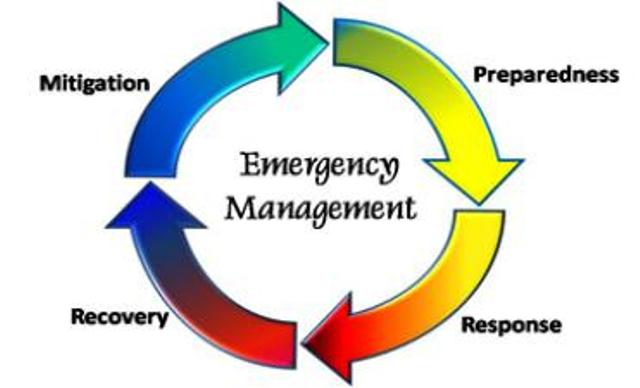
This is not a test: Disaster Preparedness in 6 Steps

We can’t predict the weather, except we know it is getting wilder and weirder.

And, sadly, most of us are ill prepared in case a tornado, hurricane, flood, fire or simple electrical outage hits our homes.  Likewise, most businesses – and most homeowners associations – don’t even have an emergency preparedness plan.

Can you make time for disaster preparedness?

Red Cross research shows that every $1 invested in preparedness yields $6 in times of disaster. To help organizations get started, it has developed a readiness self-assessment tool called www.readyrating.org

This 120-question self-assessment isn’t a pass/fail tool. Instead, ReadyRating is a FREE program helps organizations understand where they are on the readiness continuum, and it gives them tools to improve.  The program involves six steps:

  1. Commit to preparedness for your community or your property. This means getting your CEO and other top leadership committed to disaster planning.
  2. Conduct a hazard vulnerability assessment. George Sullivan, an expert in disaster preparedness for the American Red Cross says, “A lot of people write an emergency response plan based on something happened to someone else.” If you don’t know what hazards you face, call the American Red Cross which can help you assess risk.
  3. Develop an emergency response plan. “If already you have one, now is the time to revisit it and ask all the big ‘what ifs,’ such as ‘what if we’re no longer able to operate in this location?”
  4. Test your plan.  An untested plan is not a real plan – so go ahead and plan those drills.
  5. Communicate about preparedness.  Ask yourself, how can I make preparedness top of mind in my community, through newsletters and bill inserts.
  6. Help others.  By definition, a commitment to disaster preparedness is a commitment to helping others – so once you go down this path, consider adopting a local school or church, hosting a blood drive.

Are you prepared for disasters? How?